I began working on the display aspect of my project. I needed this display to be able to show images as the image generation element of my project produces images. Ideally, the images would be shown more as ‘frames’ in a video or animation rather than being seen as separate and distinct images. I started by simply using html and js to display a few images.
I had an enourmous amount of imgaes of bikes already conveniently in a folder from a previous project so I began experimenting with displaying these images.
I created an html file with a div to contain an image and wrote some css to format it to appear in the center of the page and be sqashed to 256x256px.
Then i wrote some that would change the image displayed to a diferent one.
I set up a git repo to track these changes.
I also created a dev branch so that I can play around with some changes without being too worried about breaking anything. When significant changes happen they will be pushed to the main branch. I think this will help me to keep my code safer from any mistakes that might occur down the line.
Until this point, I had just been using the npm live-server to work with my display code. Thinking about where to go from this point, I realised that using just these tools, I wouldn’t easily be able to detect changes in a folder, like a new image being added. This would be necessary for displaying images as they are created. I began looking into how I might get around this and discovered I could use some Node applications to solve this.
I recreated the previous actions but this time using node with express.
I added the following line that now tracks any changes that happen in a folder called ‘testImages’.
chokidar.watch("./public/testImages/").on("all", (event, path) => {
	console.log(event, path);
});
This took me a fair amount of time to get going with as I have not used node based applications much previously and did not know some of the underlying assumptions much of the documentation online relied on. For example, having to use a system like express to create a server and adding a static folder in order to access files.
With this, I was able to trigger actions when something happens in a folder but this was in the file that created and managed the server everything else ran on, not within the js that actaully changes the image. I began looking at how I could get these two parts working together so the display would update when the server detected a change in a folder.
Name handling approach
The first way I’ve thought of doing this is by having a js setInterval block running with a short interval time, constantly updating to show an image called ‘current.jpg’ at regular enough intervals that all new images with this name should be displayed soon enough after they are created to give an animated feel.
I named an image ‘current.jpg’ and pasted it into the images folder after updated the js to:
const imgDisplay = document.getElementById("currentFrame");
imgPath = "testImages/current.jpg"
function updateFrame(){
	imgDisplay.src = imgPath;
	console.log("updated");
}
setInterval(updateFrame,20);
The image updated from blank/not found to the current.jpg image very quickly.
I wasn’t sure if this would be sufficient for the final version but I thought a hack solution could be to have the node app constantly updating the names of files as they enter the images dir. Whilst an image is the newest it could be called current.jpg, as soon as a new one is entered, the previous ‘current’ would simply be renamed to the current datetime. I thought maybe if this was done as images are constantly pumped in, this could be fast enough for my purposes.
In working at this, I began to wonder how the node app ‘watching’ the images directory would handle the renaming of files.
I renamed one of the files in the directory and watched the output from the node app:
unlink public/testImages/test1.jpg
add public/testImages/monkey.jpg
I renamed the file ‘test1.jpg’ to ‘monkey.jpg’
I realised that this approach would need tweaking. If the app was just listening for new additions to one folder, every time a file was renamed, it would fire the same function that renames, since renaming is seen as removing one file and adding another.
With this in mind, maybe it would be best to have the file handing part of the app constantly copy new additions to the directory to a separate folder that only contains one image called ‘current’ and the display script would only look at this. Although I wasn’t exteremely optimistic about this as I thought browser caching of assets might mean that the images wouldn’t update properly.
This ended up being the case.
I tried copying some images out and dragged a few images called ‘current.jpg’ in to the folder. The image only updated the first time, when the image was found and replaced from the empty space that was there before. I think this is due to the browser using a the cached image of the same name, after it was able to find the first.
Maybe a smarter way of doing this is by using the node app as an api for the other js to retrieve the files. Going back to simply noting the changes to the image directory, maybe I could just have something note the most recent file path as a variable and then write a function that returns that file path.
Everything in the public folder (where the images are stored) should be accessible to the display script, if i type file paths to the images into my browser, the images are found so I can’t see why this wouldn’t work.
I was able to do this, I created a global variable called currentFramePath and made it so that it is set to the file path of the most recent addition to the testImages directory, as a new file is added.
var currentFramePath

app.all('/current', (req, res) => {
	if (req.method === 'GET'){
		res.send(currentFramePath);
	}

})
chokidar.watch("./public/testImages/").on("all", (event, path) => {
	console.log(event, path);
	if (event == 'add'){
		console.log("New File: '" + path + "' added")
		currentFramePath = path
	}

});
I then tried to access this endpoint from the browser and saw that it gave me the filepath I needed.
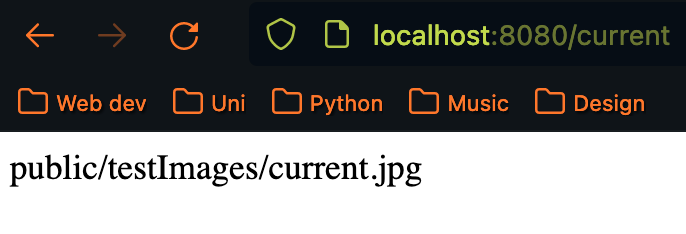
I then had the follwing js run every 20ms in the display js file
function updateFrame(){
	fetch('http://localhost:8080/current')
	.then((response) => response.json())
	.then((data) => imgPath = data.path)

	imgDisplay.src = imgPath;
	console.log("updated");
}
I created a python script to pump in a large amount of images to the image directory a couple of times a second and the display seems to keep up. It may not be exactly even between each frame but I think its good enough for now.
I am satisfied with how this part of the system is working for now and can focus on getting some other elements up and running.
Bibliography
https://stackoverflow.com/questions/24582338/how-can-i-include-css-files-using-node-express-and-ejs